Node Data Structure
SSML Editor is an extension of the Slate Vue3 component, developed based on Slate as its core. Please refer to the official documentation to learn about Slate Node design.
Quick Start
To quickly understand the data structure of various nodes, please visit the online example page. After manipulating the editor content, click the Submit button to view the Nodes structure output in the browser console.
For example, write a text segment, insert an sound element, or set a polyphonic word - you can see their data structures by checking console print editor.children.
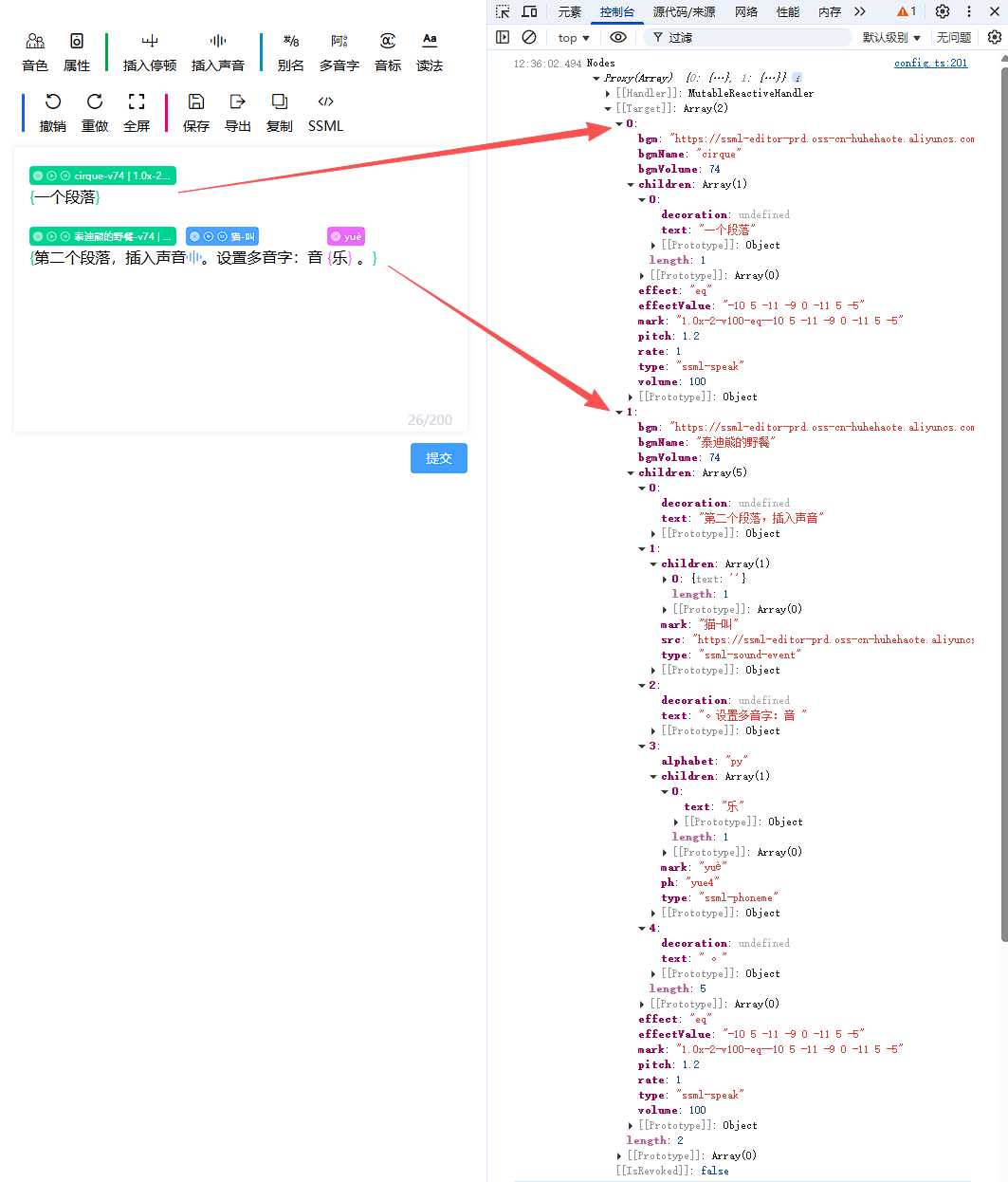
Text Node
Text nodes, such as { text: 'hello' }, must contain the text property. Custom properties can be added, for example bold text can be represented as { text: 'hello', bold: true }, with other properties extendable as needed.
Note: Text nodes are leaf nodes, so they don't have child nodes or a children property.
Element Node
Element nodes, such as { type: 'ssml-phoneme', mark: 'yuè', ph: 'yue4', alphabet: 'py', children: [ { text: '乐' } ] }, must contain three required properties: type, mark, and children. Custom properties like ph and alphabet can be added as needed.
-
The
typeproperty indicates the element node's type (ensure uniqueness of this value, avoid using the same value for different node types). -
The
markproperty stores the identification content displayed in the tooltip area above the corresponding element in the editor. -
The
childrenproperty stores the element node's child nodes, which can be text nodes or element nodes (ensure this property always contains at least one node).
Inline Element
Elements are displayed as block by default, occupying a full line. However, we often need to change them to inline display.
We can use plugins to modify isInline to convert elements to inline display. See the break element's plugin source code for reference.
...
newEditor.isInline = (element: Element) => {
  const type = NodeUtils.getNodeType(element);
  if (type === BREAK_TYPE) return true;
  return isInline(element);
};
...
Void Element
Some elements need to be defined as void type (without child nodes), such as <break> and <soundEvent> .
We can use plugins to modify isVoid to convert elements to void type. See the break element's plugin source code for reference.
...
newEditor.isVoid = (element: Element) => {
    const type = NodeUtils.getNodeType(element);
    if (type === BREAK_TYPE) return true;
    return isVoid(element);
  };
...
Note: Although void type elements semantically don't have child nodes, they still need to be defined as element nodes with a children property containing a single empty string text node. For example, the break element:
{
    type: 'ssml-break',
    mark: '50ms',
    time: '50ms',
    children: [{ text: '' }] // Void elements must have a children property containing exactly one empty string text node, important!!!
}
Built-in Node Structures in editor-vue Package
For detailed node data structures, please directly check the model definitions in the source code.
-
Properties - Extended element node properties
-
Break - Defined inline void extended element node properties
-
Sound - Defined inline void extended element node properties
-
Alias - Defined inline extended element node properties
-
Polyphonic characters and phonetic transcription - Defined inline extended element node properties
-
Say As - Defined inline extended element node properties